What is Ontrack Staff Hub?
Ontrack Staff Hub brings together the information and services you need for your day-to-day work with learners. From the homepage, you can monitor key information, find records and open the areas available to you.
Homepage
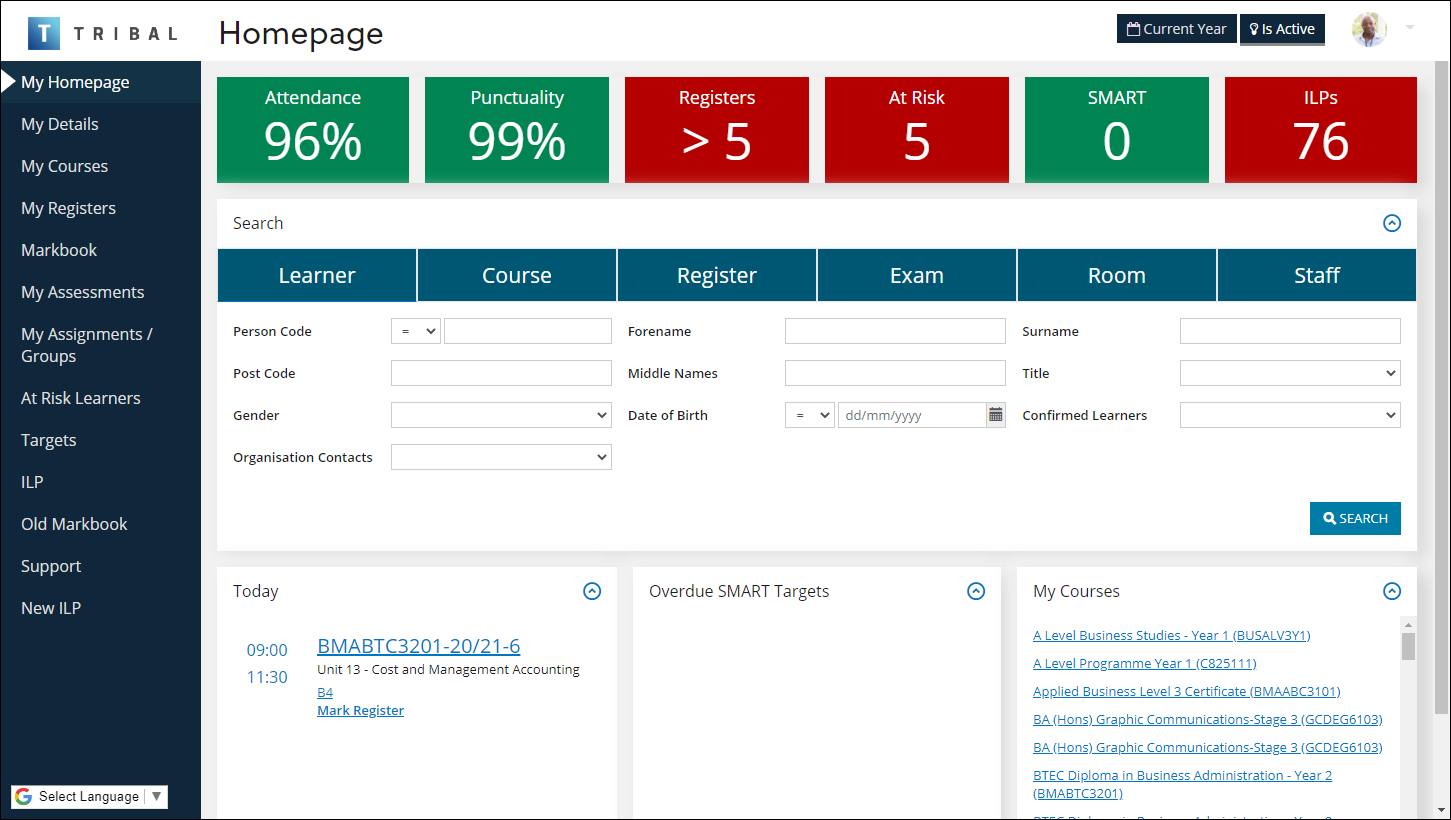
The homepage is your starting point in Ontrack Staff Hub. It can include:
-
A header with account options and filters.
-
Key performance indicators.
-
Searches for different types of records.
-
Personalised information.
-
Navigation to other areas of the system.
-
NZ Register information.
The image below shows an example of the Ontrack Staff Hub homepage.
Filters
The header remains available as you move through Ontrack Staff Hub. It contains filters that control the information displayed in searches and on pages as follows:
-
Current Year applies the current-year settings configured by your institution. A tooltip shows the dates included in the current year.
-
All Records switches between active records and all records. On a smaller screen, these filters are available from Settings.
Your account menu provides access to account management, settings, accessibility features, help, reports and sign-out options. The options available depend on your system configuration and permissions.
Key performance indicators
Key performance indicators provide an overview of information that might need your attention:
- Attendance
- The percentage of present learners on your registers.
- Punctuality
- The percentage of late marks on registers associated with you.
- Registers
- The number of your unmarked registers.
- UK At Risk
- The number of learners whose general status isn’t set to OK.
- UK SMART
- The number of outstanding SMART targets past their due date.
- UK ILPs
- The number of individual learning plans that need completing or have passed their follow-up date.
Each indicator links to the related area. For example, the Attendance and Punctuality indicators link to the attendance and punctuality pages.
The image below shows an example of key performance indicators.

Search
Depending on your institution’s configuration, you can search for:
-
Learners
-
Courses
-
Registers
-
UK Exams
-
UK Rooms
-
UK Staff members.
Each search provides criteria relevant to that type of record. The Current Year and All Records filters can affect which records appear in the results. The image below shows an example of the search options for learners.

Personalised information
Homepage panels bring together information associated with your account. You can use them to review:
-
Events taking place today.
-
Overdue SMART targets; and
-
Courses linked to you.
Register information
If you have access to register functionality, the homepage can show eRegisters dated today or earlier that are ready to mark. Each eRegister links to the Mark Register screen.
The homepage can also show your register events for the next seven days. Each event links to the Register Details screen.
Navigation
The navigation pane provides access to the areas of Ontrack Staff Hub available to you. These areas can include:
-
Personal details and courses.
-
Registers and assessments.
-
Assignments and markbooks.
-
Learner support and individual learning plans.
-
Other services available to your institution.
Some areas appear only if your institution has the required licence and you have permission to use them. These areas can include assignments, markbooks, pastoral support, at-risk learners and individual learning plans.